Docker 入門
Laravel アプリケーション実行環境を Docker で構築する
Laravel Sail による開発環境を構築する
別のページではVirtual Box と Vagrant を用いて Ubuntu の仮想環境を構築し,その中で Laravel アプリケーションの開発環境を構築していました.この方法では環境構築に手間と時間を要し,開発時のオーバーヘッドも大きいという欠点があります.
ここでは Laravel アプリケーションの開発環境のひとつである Laravel Sail を利用する方法を説明します.Laravel Sail では内部的に Docker を利用した開発環境の構築が手軽にできるようになります.Docker の利用経験がなくても Laravel Sail を利用することは比較的容易ですし,Docker の利用経験があればより理解が深まるはずです.さらに,Laravel Sail で開発を進めると,それと同時に Docker への理解も深まることが予想されます.
ここでは Laravel ver.12 でここで作成したものとほぼ同様のコメント掲示板の作成手順を示します.
まず,Docker がインストールされていることを確認します.もしもインストールされていないようであれば,ここを参考に Docker をインストールしてください.
~ % docker --version ⏎
Docker version 28.3.3, build 980b856
~ %
Laravel プロジェクトは Documents フォルダに laravel サブフォルダを作成し,その中に配置することにします.このためのフォルダを作成し,作成したフォルダに移動しておきます.
~ % cd Documents ⏎
Documents % mkdir laravel ⏎
Documents % cd laravel ⏎
laravel %
新規プロジェクトの作成
新規プロジェクトを作成するには,次のようなコマンドを実行します.ここで,「プロジェクト名」には任意の名称を指定します.
laravel % curl -s "https://laravel.build/プロジェクト名" | bash ⏎
ここでは,「laravel-comment-app-2025」という名称でプロジェクトを作成することにします.プロジェクトの作成には少々の時間を要します.作成中には多くの情報が表示されています.その最後には次に実行するべきコマンドが表示されていることにも注意してください.
laravel % curl -s "https://laravel.build/laravel-comment-app-2025" | bash ⏎

latest: Pulling from laravelsail/php84-composer
6d29a096dd42: Pull complete
5a2c3efb5abb: Pull complete
44629439c7e4: Pull complete
ebc85a62df49: Pull complete
8c35712de297: Pull complete
ef5bac2eebcb: Pull complete
c1d5eedcba05: Pull complete
6b346d003c9c: Pull complete
44b325234e4a: Pull complete
19c29b6c9463: Pull complete
75ade918ae37: Pull complete
fa627c789e1b: Pull complete
4f4fb700ef54: Pull complete
e6e8377aafe1: Pull complete
733ce3725146: Pull complete
Digest: sha256:a2716e93e577c80bca7551126056446c1e06cb141af652ee6932537158108400
Status: Downloaded newer image for laravelsail/php84-composer:latest
   WARN  TTY mode requires /dev/tty to be read/writable.

    Creating a "laravel/laravel" project at "./laravel-comment-app-2025"
    Installing laravel/laravel (v12.7.1)
      - Downloading laravel/laravel (v12.7.1)
      - Installing laravel/laravel (v12.7.1): Extracting archive
    Created project in /opt/laravel-comment-app-2025
    Loading composer repositories with package information
    Updating dependencies
    Lock file operations: 112 installs, 0 updates, 0 removals
      - Locking brick/math (0.14.0)
  - Locking carbonphp/carbon-doctrine-types (3.2.0)
  - Locking dflydev/dot-access-data (v3.0.3)
      - Locking doctrine/inflector (2.1.0)
  - Locking doctrine/lexer (3.0.1)
  - Locking dragonmantank/cron-expression (v3.4.0)
  - Locking egulias/email-validator (4.0.4)
  - Locking fakerphp/faker (v1.24.1)
  - Locking filp/whoops (2.18.4)
  - Locking fruitcake/php-cors (v1.3.0)
  - Locking graham-campbell/result-type (v1.1.3)
  - Locking guzzlehttp/guzzle (7.10.0)
      - Locking guzzlehttp/promises (2.3.0)
  - Locking guzzlehttp/psr7 (2.8.0)
  - Locking guzzlehttp/uri-template (v1.0.5)
      - Locking hamcrest/hamcrest-php (v2.1.1)
      - Locking laravel/framework (v12.34.0)
  - Locking laravel/pail (v1.2.3)
  - Locking laravel/pint (v1.25.1)
  - Locking laravel/prompts (v0.3.7)
  - Locking laravel/sail (v1.46.0)
  - Locking laravel/serializable-closure (v2.0.6)
  - Locking laravel/tinker (v2.10.1)
  - Locking league/commonmark (2.7.1)
  - Locking league/config (v1.2.0)
  - Locking league/flysystem (3.30.0)
  - Locking league/flysystem-local (3.30.0)
  - Locking league/mime-type-detection (1.16.0)
  - Locking league/uri (7.5.1)
  - Locking league/uri-interfaces (7.5.0)
  - Locking mockery/mockery (1.6.12)
      - Locking monolog/monolog (3.9.0)
  - Locking myclabs/deep-copy (1.13.4)
  - Locking nesbot/carbon (3.10.3)
      - Locking nette/schema (v1.3.2)
      - Locking nette/utils (v4.0.8)
      - Locking nikic/php-parser (v5.6.1)
  - Locking nunomaduro/collision (v8.8.2)
      - Locking nunomaduro/termwind (v2.3.2)
  - Locking phar-io/manifest (2.0.4)
      - Locking phar-io/version (3.2.1)
  - Locking phpoption/phpoption (1.9.4)
      - Locking phpunit/php-code-coverage (11.0.11)
      - Locking phpunit/php-file-iterator (5.1.0)
  - Locking phpunit/php-invoker (5.0.1)
      - Locking phpunit/php-text-template (4.0.1)
  - Locking phpunit/php-timer (7.0.1)
      - Locking phpunit/phpunit (11.5.42)
  - Locking psr/clock (1.0.0)
      - Locking psr/container (2.0.2)
      - Locking psr/event-dispatcher (1.0.0)
      - Locking psr/http-client (1.0.3)
      - Locking psr/http-factory (1.1.0)
      - Locking psr/http-message (2.0)
  - Locking psr/log (3.0.2)
      - Locking psr/simple-cache (3.0.0)
      - Locking psy/psysh (v0.12.12)
  - Locking ralouphie/getallheaders (3.0.3)
      - Locking ramsey/collection (2.1.1)
      - Locking ramsey/uuid (4.9.1)
      - Locking sebastian/cli-parser (3.0.2)
      - Locking sebastian/code-unit (3.0.3)
      - Locking sebastian/code-unit-reverse-lookup (4.0.1)
      - Locking sebastian/comparator (6.3.2)
      - Locking sebastian/complexity (4.0.1)
      - Locking sebastian/diff (6.0.2)
  - Locking sebastian/environment (7.2.1)
      - Locking sebastian/exporter (6.3.2)
      - Locking sebastian/global-state (7.0.2)
      - Locking sebastian/lines-of-code (3.0.1)
  - Locking sebastian/object-enumerator (6.0.1)
  - Locking sebastian/object-reflector (4.0.1)
  - Locking sebastian/recursion-context (6.0.3)
  - Locking sebastian/type (5.1.3)
  - Locking sebastian/version (5.0.2)
  - Locking staabm/side-effects-detector (1.0.5)
  - Locking symfony/clock (v7.3.0)
  - Locking symfony/console (v7.3.4)
  - Locking symfony/css-selector (v7.3.0)
      - Locking symfony/deprecation-contracts (v3.6.0)
  - Locking symfony/error-handler (v7.3.4)
  - Locking symfony/event-dispatcher (v7.3.3)
  - Locking symfony/event-dispatcher-contracts (v3.6.0)
      - Locking symfony/finder (v7.3.2)
      - Locking symfony/http-foundation (v7.3.4)
      - Locking symfony/http-kernel (v7.3.4)
      - Locking symfony/mailer (v7.3.4)
      - Locking symfony/mime (v7.3.4)
      - Locking symfony/polyfill-ctype (v1.33.0)
  - Locking symfony/polyfill-intl-grapheme (v1.33.0)
      - Locking symfony/polyfill-intl-idn (v1.33.0)
      - Locking symfony/polyfill-intl-normalizer (v1.33.0)
      - Locking symfony/polyfill-mbstring (v1.33.0)
      - Locking symfony/polyfill-php80 (v1.33.0)
  - Locking symfony/polyfill-php83 (v1.33.0)
      - Locking symfony/polyfill-php84 (v1.33.0)
      - Locking symfony/polyfill-php85 (v1.33.0)
      - Locking symfony/polyfill-uuid (v1.33.0)
      - Locking symfony/process (v7.3.4)
      - Locking symfony/routing (v7.3.4)
      - Locking symfony/service-contracts (v3.6.0)
      - Locking symfony/string (v7.3.4)
  - Locking symfony/translation (v7.3.4)
  - Locking symfony/translation-contracts (v3.6.0)
  - Locking symfony/uid (v7.3.1)
  - Locking symfony/var-dumper (v7.3.4)
  - Locking symfony/yaml (v7.3.3)
      - Locking theseer/tokenizer (1.2.3)
  - Locking tijsverkoyen/css-to-inline-styles (v2.3.0)
  - Locking vlucas/phpdotenv (v5.6.2)
      - Locking voku/portable-ascii (2.0.3)
  - Locking webmozart/assert (1.11.0)
    Writing lock file
Installing dependencies from lock file (including require-dev)
    Package operations: 112 installs, 0 updates, 0 removals
      - Downloading doctrine/inflector (2.1.0)
      - Downloading doctrine/lexer (3.0.1)
      - Downloading webmozart/assert (1.11.0)
      - Downloading dragonmantank/cron-expression (v3.4.0)
      - Downloading symfony/deprecation-contracts (v3.6.0)
      - Downloading fakerphp/faker (v1.24.1)
      - Downloading symfony/polyfill-php83 (v1.33.0)
      - Downloading symfony/polyfill-mbstring (v1.33.0)
      - Downloading symfony/http-foundation (v7.3.4)
      - Downloading fruitcake/php-cors (v1.3.0)
      - Downloading psr/http-message (2.0)
      - Downloading psr/http-client (1.0.3)
      - Downloading ralouphie/getallheaders (3.0.3)
      - Downloading psr/http-factory (1.1.0)
      - Downloading guzzlehttp/psr7 (2.8.0)
      - Downloading guzzlehttp/promises (2.3.0)
      - Downloading guzzlehttp/guzzle (7.10.0)
      - Downloading symfony/polyfill-php80 (v1.33.0)
      - Downloading guzzlehttp/uri-template (v1.0.5)
      - Downloading symfony/polyfill-intl-grapheme (v1.33.0)
      - Downloading symfony/string (v7.3.4)
      - Downloading symfony/service-contracts (v3.6.0)
      - Downloading symfony/console (v7.3.4)
      - Downloading nunomaduro/termwind (v2.3.2)
      - Downloading phpoption/phpoption (1.9.4)
      - Downloading graham-campbell/result-type (v1.1.3)
      - Downloading vlucas/phpdotenv (v5.6.2)
      - Downloading symfony/css-selector (v7.3.0)
      - Downloading tijsverkoyen/css-to-inline-styles (v2.3.0)
      - Downloading symfony/var-dumper (v7.3.4)
      - Downloading symfony/polyfill-uuid (v1.33.0)
      - Downloading symfony/uid (v7.3.1)
      - Downloading symfony/routing (v7.3.4)
      - Downloading symfony/process (v7.3.4)
      - Downloading symfony/polyfill-php85 (v1.33.0)
      - Downloading symfony/polyfill-php84 (v1.33.0)
      - Downloading symfony/polyfill-intl-idn (v1.33.0)
      - Downloading symfony/mime (v7.3.4)
      - Downloading psr/event-dispatcher (1.0.0)
      - Downloading symfony/event-dispatcher-contracts (v3.6.0)
      - Downloading symfony/event-dispatcher (v7.3.3)
      - Downloading psr/log (3.0.2)
      - Downloading egulias/email-validator (4.0.4)
      - Downloading symfony/mailer (v7.3.4)
      - Downloading symfony/error-handler (v7.3.4)
      - Downloading symfony/http-kernel (v7.3.4)
      - Downloading symfony/finder (v7.3.2)
      - Downloading ramsey/collection (2.1.1)
      - Downloading brick/math (0.14.0)
      - Downloading ramsey/uuid (4.9.1)
      - Downloading symfony/translation-contracts (v3.6.0)
      - Downloading symfony/translation (v7.3.4)
      - Downloading symfony/clock (v7.3.0)
      - Downloading nesbot/carbon (3.10.3)
      - Downloading monolog/monolog (3.9.0)
      - Downloading league/uri-interfaces (7.5.0)
      - Downloading league/uri (7.5.1)
      - Downloading league/mime-type-detection (1.16.0)
      - Downloading league/flysystem-local (3.30.0)
      - Downloading league/flysystem (3.30.0)
      - Downloading nette/utils (v4.0.8)
      - Downloading nette/schema (v1.3.2)
      - Downloading dflydev/dot-access-data (v3.0.3)
      - Downloading league/config (v1.2.0)
      - Downloading league/commonmark (2.7.1)
      - Downloading laravel/serializable-closure (v2.0.6)
      - Downloading laravel/prompts (v0.3.7)
      - Downloading laravel/framework (v12.34.0)
      - Downloading laravel/pail (v1.2.3)
      - Downloading laravel/pint (v1.25.1)
      - Downloading symfony/yaml (v7.3.3)
      - Downloading laravel/sail (v1.46.0)
      - Downloading nikic/php-parser (v5.6.1)
      - Downloading psy/psysh (v0.12.12)
      - Downloading laravel/tinker (v2.10.1)
      - Downloading hamcrest/hamcrest-php (v2.1.1)
      - Downloading mockery/mockery (1.6.12)
      - Downloading filp/whoops (2.18.4)
      - Downloading nunomaduro/collision (v8.8.2)
      - Downloading staabm/side-effects-detector (1.0.5)
      - Downloading sebastian/version (5.0.2)
      - Downloading sebastian/type (5.1.3)
      - Downloading sebastian/recursion-context (6.0.3)
      - Downloading sebastian/object-reflector (4.0.1)
      - Downloading sebastian/object-enumerator (6.0.1)
      - Downloading sebastian/global-state (7.0.2)
      - Downloading sebastian/exporter (6.3.2)
      - Downloading sebastian/environment (7.2.1)
      - Downloading sebastian/diff (6.0.2)
      - Downloading sebastian/comparator (6.3.2)
      - Downloading sebastian/code-unit (3.0.3)
      - Downloading sebastian/cli-parser (3.0.2)
      - Downloading phpunit/php-timer (7.0.1)
      - Downloading phpunit/php-text-template (4.0.1)
      - Downloading phpunit/php-invoker (5.0.1)
      - Downloading phpunit/php-file-iterator (5.1.0)
      - Downloading sebastian/lines-of-code (3.0.1)
      - Downloading sebastian/complexity (4.0.1)
      - Downloading sebastian/code-unit-reverse-lookup (4.0.1)
      - Downloading phpunit/php-code-coverage (11.0.11)
      - Downloading myclabs/deep-copy (1.13.4)
      - Downloading phpunit/phpunit (11.5.42)
      - Installing doctrine/inflector (2.1.0): Extracting archive
      - Installing doctrine/lexer (3.0.1): Extracting archive
      - Installing symfony/polyfill-ctype (v1.33.0): Extracting archive
      - Installing webmozart/assert (1.11.0): Extracting archive
      - Installing dragonmantank/cron-expression (v3.4.0): Extracting archive
      - Installing symfony/deprecation-contracts (v3.6.0): Extracting archive
      - Installing psr/container (2.0.2): Extracting archive
      - Installing fakerphp/faker (v1.24.1): Extracting archive
      - Installing symfony/polyfill-php83 (v1.33.0): Extracting archive
      - Installing symfony/polyfill-mbstring (v1.33.0): Extracting archive
      - Installing symfony/http-foundation (v7.3.4): Extracting archive
      - Installing fruitcake/php-cors (v1.3.0): Extracting archive
      - Installing psr/http-message (2.0): Extracting archive
      - Installing psr/http-client (1.0.3): Extracting archive
      - Installing ralouphie/getallheaders (3.0.3): Extracting archive
      - Installing psr/http-factory (1.1.0): Extracting archive
      - Installing guzzlehttp/psr7 (2.8.0): Extracting archive
      - Installing guzzlehttp/promises (2.3.0): Extracting archive
      - Installing guzzlehttp/guzzle (7.10.0): Extracting archive
      - Installing symfony/polyfill-php80 (v1.33.0): Extracting archive
      - Installing guzzlehttp/uri-template (v1.0.5): Extracting archive
      - Installing symfony/polyfill-intl-normalizer (v1.33.0): Extracting archive
      - Installing symfony/polyfill-intl-grapheme (v1.33.0): Extracting archive
      - Installing symfony/string (v7.3.4): Extracting archive
      - Installing symfony/service-contracts (v3.6.0): Extracting archive
      - Installing symfony/console (v7.3.4): Extracting archive
      - Installing nunomaduro/termwind (v2.3.2): Extracting archive
      - Installing voku/portable-ascii (2.0.3): Extracting archive
      - Installing phpoption/phpoption (1.9.4): Extracting archive
      - Installing graham-campbell/result-type (v1.1.3): Extracting archive
      - Installing vlucas/phpdotenv (v5.6.2): Extracting archive
      - Installing symfony/css-selector (v7.3.0): Extracting archive
      - Installing tijsverkoyen/css-to-inline-styles (v2.3.0): Extracting archive
      - Installing symfony/var-dumper (v7.3.4): Extracting archive
      - Installing symfony/polyfill-uuid (v1.33.0): Extracting archive
      - Installing symfony/uid (v7.3.1): Extracting archive
      - Installing symfony/routing (v7.3.4): Extracting archive
      - Installing symfony/process (v7.3.4): Extracting archive
      - Installing symfony/polyfill-php85 (v1.33.0): Extracting archive
      - Installing symfony/polyfill-php84 (v1.33.0): Extracting archive
      - Installing symfony/polyfill-intl-idn (v1.33.0): Extracting archive
      - Installing symfony/mime (v7.3.4): Extracting archive
      - Installing psr/event-dispatcher (1.0.0): Extracting archive
      - Installing symfony/event-dispatcher-contracts (v3.6.0): Extracting archive
      - Installing symfony/event-dispatcher (v7.3.3): Extracting archive
      - Installing psr/log (3.0.2): Extracting archive
      - Installing egulias/email-validator (4.0.4): Extracting archive
      - Installing symfony/mailer (v7.3.4): Extracting archive
      - Installing symfony/error-handler (v7.3.4): Extracting archive
      - Installing symfony/http-kernel (v7.3.4): Extracting archive
      - Installing symfony/finder (v7.3.2): Extracting archive
      - Installing ramsey/collection (2.1.1): Extracting archive
      - Installing brick/math (0.14.0): Extracting archive
      - Installing ramsey/uuid (4.9.1): Extracting archive
      - Installing psr/simple-cache (3.0.0): Extracting archive
      - Installing symfony/translation-contracts (v3.6.0): Extracting archive
      - Installing symfony/translation (v7.3.4): Extracting archive
      - Installing psr/clock (1.0.0): Extracting archive
      - Installing symfony/clock (v7.3.0): Extracting archive
      - Installing carbonphp/carbon-doctrine-types (3.2.0): Extracting archive
      - Installing nesbot/carbon (3.10.3): Extracting archive
      - Installing monolog/monolog (3.9.0): Extracting archive
      - Installing league/uri-interfaces (7.5.0): Extracting archive
      - Installing league/uri (7.5.1): Extracting archive
      - Installing league/mime-type-detection (1.16.0): Extracting archive
      - Installing league/flysystem-local (3.30.0): Extracting archive
      - Installing league/flysystem (3.30.0): Extracting archive
      - Installing nette/utils (v4.0.8): Extracting archive
      - Installing nette/schema (v1.3.2): Extracting archive
      - Installing dflydev/dot-access-data (v3.0.3): Extracting archive
      - Installing league/config (v1.2.0): Extracting archive
      - Installing league/commonmark (2.7.1): Extracting archive
      - Installing laravel/serializable-closure (v2.0.6): Extracting archive
      - Installing laravel/prompts (v0.3.7): Extracting archive
      - Installing laravel/framework (v12.34.0): Extracting archive
      - Installing laravel/pail (v1.2.3): Extracting archive
      - Installing laravel/pint (v1.25.1): Extracting archive
      - Installing symfony/yaml (v7.3.3): Extracting archive
      - Installing laravel/sail (v1.46.0): Extracting archive
      - Installing nikic/php-parser (v5.6.1): Extracting archive
      - Installing psy/psysh (v0.12.12): Extracting archive
      - Installing laravel/tinker (v2.10.1): Extracting archive
      - Installing hamcrest/hamcrest-php (v2.1.1): Extracting archive
      - Installing mockery/mockery (1.6.12): Extracting archive
      - Installing filp/whoops (2.18.4): Extracting archive
      - Installing nunomaduro/collision (v8.8.2): Extracting archive
      - Installing staabm/side-effects-detector (1.0.5): Extracting archive
      - Installing sebastian/version (5.0.2): Extracting archive
      - Installing sebastian/type (5.1.3): Extracting archive
      - Installing sebastian/recursion-context (6.0.3): Extracting archive
      - Installing sebastian/object-reflector (4.0.1): Extracting archive
      - Installing sebastian/object-enumerator (6.0.1): Extracting archive
      - Installing sebastian/global-state (7.0.2): Extracting archive
      - Installing sebastian/exporter (6.3.2): Extracting archive
      - Installing sebastian/environment (7.2.1): Extracting archive
      - Installing sebastian/diff (6.0.2): Extracting archive
      - Installing sebastian/comparator (6.3.2): Extracting archive
      - Installing sebastian/code-unit (3.0.3): Extracting archive
      - Installing sebastian/cli-parser (3.0.2): Extracting archive
      - Installing phpunit/php-timer (7.0.1): Extracting archive
      - Installing phpunit/php-text-template (4.0.1): Extracting archive
      - Installing phpunit/php-invoker (5.0.1): Extracting archive
      - Installing phpunit/php-file-iterator (5.1.0): Extracting archive
      - Installing theseer/tokenizer (1.2.3): Extracting archive
      - Installing sebastian/lines-of-code (3.0.1): Extracting archive
      - Installing sebastian/complexity (4.0.1): Extracting archive
      - Installing sebastian/code-unit-reverse-lookup (4.0.1): Extracting archive
      - Installing phpunit/php-code-coverage (11.0.11): Extracting archive
      - Installing phar-io/version (3.2.1): Extracting archive
      - Installing phar-io/manifest (2.0.4): Extracting archive
      - Installing myclabs/deep-copy (1.13.4): Extracting archive
      - Installing phpunit/phpunit (11.5.42): Extracting archive
    59 package suggestions were added by new dependencies, use `composer suggest` to see details.
    Generating optimized autoload files
    81 packages you are using are looking for funding.
Use the `composer fund` command to find out more!
    No security vulnerability advisories found.
    > @php -r "file_exists('.env') || copy('.env.example', '.env');"

   INFO  Application key set successfully.

   WARN  TTY mode requires /dev/tty to be read/writable.


   INFO  Preparing database.

      Creating migration table     .......................................     3.64ms     DONE

       INFO  Running migrations.

      0001_01_01_000000_create_users_table     ...........................     6.00ms     DONE
      0001_01_01_000001_create_cache_table     ...........................     2.21ms     DONE
      0001_01_01_000002_create_jobs_table     ............................     7.57ms     DONE

   INFO  Application ready in [laravel-comment-app-2025]. You can start your local development using:

➜ cd laravel-comment-app-2025
➜ npm install && npm run build
➜ composer run dev

  New to Laravel? Check out our bootcamp and documentation. Build something amazing!

   WARN  TTY mode requires /dev/tty to be read/writable.


   INFO  Sail scaffolding installed successfully. You may run your Docker containers using Sail's "up" command.

➜ ./vendor/bin/sail up

   WARN  A database service was installed. Run "artisan migrate" to prepare your database:

➜ ./vendor/bin/sail artisan migrate

WARN[0000] The "MYSQL_EXTRA_OPTIONS" variable is not set. Defaulting to a blank string.
WARN[0000] The "MYSQL_EXTRA_OPTIONS" variable is not set. Defaulting to a blank string.
[+] Pulling 59/59
 ✔ mysql Pulled                                                           72.1s
 ✔ redis Pulled                                                           12.6s
 ✔ mailpit Pulled                                                         68.1s
 ✔ selenium Pulled                                                        67.0s
 ✔ meilisearch Pulled                                                     12.5s

WARN[0000] The "MYSQL_EXTRA_OPTIONS" variable is not set. Defaulting to a blank string.
WARN[0000] The "MYSQL_EXTRA_OPTIONS" variable is not set. Defaulting to a blank string.
[+] Building 346.9s (21/21) FINISHED
 => [internal] load local bake definitions                                 0.0s
 => => reading from stdin 726B                                             0.0s
 => [internal] load build definition from Dockerfile                       0.0s
 => => transferring dockerfile: 3.71kB                                     0.0s
 => [internal] load metadata for docker.io/library/ubuntu:24.04            3.0s
 => [internal] load .dockerignore                                          0.0s
 => => transferring context: 2B                                            0.0s
 => [ 1/14] FROM docker.io/library/ubuntu:24.04@sha256:66460d557b25769b10  3.2s
 => => resolve docker.io/library/ubuntu:24.04@sha256:66460d557b25769b1021  0.0s
 => => sha256:e149199029d15548c4f6d2666e88879360381a2be8a 2.31kB / 2.31kB  0.0s
 => => sha256:b8a35db46e38ce87d4e743e1265ff436ed36e01d2 28.86MB / 28.86MB  2.4s
 => => sha256:66460d557b25769b102175144d538d88219c077c678 6.69kB / 6.69kB  0.0s
 => => sha256:3372ac029cdf2ade8c2f8373590af8ca6422e84b99bf62c 424B / 424B  0.0s
 => => extracting sha256:b8a35db46e38ce87d4e743e1265ff436ed36e01d23246b24  0.7s
 => [internal] load build context                                          0.0s
 => => transferring context: 1.12kB                                        0.0s
 => [ 2/14] WORKDIR /var/www/html                                          0.7s
 => [ 3/14] RUN ln -snf /usr/share/zoneinfo/UTC /etc/localtime && echo UT  0.1s
 => [ 4/14] RUN echo "Acquire::http::Pipeline-Depth 0;" > /etc/apt/apt.co  0.1s
 => [ 5/14] RUN apt-get update && apt-get upgrade -y     && mkdir -p /e  334.1s
 => [ 6/14] RUN setcap "cap_net_bind_service=+ep" /usr/bin/php8.4          0.1s
 => [ 7/14] RUN userdel -r ubuntu                                          0.5s
 => [ 8/14] RUN groupadd --force -g 20 sail                                0.1s
 => [ 9/14] RUN useradd -ms /bin/bash --no-user-group -g 20 -u 1337 sail   0.1s
 => [10/14] RUN git config --global --add safe.directory /var/www/html     0.1s
 => [11/14] COPY start-container /usr/local/bin/start-container            0.0s
 => [12/14] COPY supervisord.conf /etc/supervisor/conf.d/supervisord.conf  0.0s
 => [13/14] COPY php.ini /etc/php/8.4/cli/conf.d/99-sail.ini               0.0s
 => [14/14] RUN chmod +x /usr/local/bin/start-container                    0.1s
 => exporting to image                                                     4.3s
 => => exporting layers                                                    4.3s
 => => writing image sha256:31cf15f8dbad27da4d1434703d49a05da4259f817dc0a  0.0s
 => => naming to sail-8.4/app                                              0.0s
 => resolving provenance for metadata file                                 0.0s
[+] Building 1/1
 ✔ sail-8.4/app  Built                                                     0.0s

Please provide your password so we can make some final adjustments to your application's permissions.

Password:

Thank you! We hope you build something incredible. Dive in with: cd laravel-comment-app-2025 && ./vendor/bin/sail up
laravel %
プロジェクトが作成できたら,プロジェクトのフォルダ(ディレクトリ)に移動します.
laravel % cd laravel-comment-app-2025 ⏎
laravel-comment-app-2025 %
編集作業を始める前にあらかじめ Git でコミットしておくと良いでしょう.
laravel-comment-app-2025 % ls ⏎
app		composer.json	package.json	resources	vendor
artisan		composer.lock	phpunit.xml	routes		vite.config.js
bootstrap	config		public		storage
compose.yaml	database	README.md	tests
laravel-comment-app-2025 % git init . ⏎
hint: Using 'master' as the name for the initial branch. This default branch name
hint: is subject to change. To configure the initial branch name to use in all
hint: of your new repositories, which will suppress this warning, call:
hint:
hint: 	git config --global init.defaultBranch <name>
hint:
hint: Names commonly chosen instead of 'master' are 'main', 'trunk' and
hint: 'development'. The just-created branch can be renamed via this command:
hint:
hint: 	git branch -m <name>
hint:
hint: Disable this message with "git config set advice.defaultBranchName false"
Initialized empty Git repository in /Users/rinsaka/Documents/work/laravel/laravel-comment-app-2025/.git/
laravel-comment-app-2025 % git branch -m main ⏎
laravel-comment-app-2025 % git status ⏎
On branch main

No commits yet

Untracked files:
  (use "git add <file>..." to include in what will be committed)
	.editorconfig
	.env.example
	.gitattributes
	.gitignore
	README.md
	app/
	artisan
	bootstrap/
	compose.yaml
	composer.json
	composer.lock
	config/
	database/
	package.json
	phpunit.xml
	public/
	resources/
	routes/
	storage/
	tests/
	vite.config.js

nothing added to commit but untracked files present (use "git add" to track)
laravel-comment-app-2025 % git add . ⏎
laravel-comment-app-2025 % git commit -m'initial commit' ⏎
[main (root-commit) b46b4dc] initial commit
 57 files changed, 10846 insertions(+)
 create mode 100644 .editorconfig
 create mode 100644 .env.example
 create mode 100644 .gitattributes
 create mode 100644 .gitignore
 create mode 100644 README.md
 create mode 100644 app/Http/Controllers/Controller.php
 create mode 100644 app/Models/User.php
 create mode 100644 app/Providers/AppServiceProvider.php
 create mode 100755 artisan
 create mode 100644 bootstrap/app.php
 create mode 100644 bootstrap/cache/.gitignore
 create mode 100644 bootstrap/providers.php
 create mode 100644 compose.yaml
 create mode 100644 composer.json
 create mode 100644 composer.lock
 create mode 100644 config/app.php
 create mode 100644 config/auth.php
 create mode 100644 config/cache.php
 create mode 100644 config/database.php
 create mode 100644 config/filesystems.php
 create mode 100644 config/logging.php
 create mode 100644 config/mail.php
 create mode 100644 config/queue.php
 create mode 100644 config/services.php
 create mode 100644 config/session.php
 create mode 100644 database/.gitignore
 create mode 100644 database/factories/UserFactory.php
 create mode 100644 database/migrations/0001_01_01_000000_create_users_table.php
 create mode 100644 database/migrations/0001_01_01_000001_create_cache_table.php
 create mode 100644 database/migrations/0001_01_01_000002_create_jobs_table.php
 create mode 100644 database/seeders/DatabaseSeeder.php
 create mode 100644 package.json
 create mode 100644 phpunit.xml
 create mode 100644 public/.htaccess
 create mode 100644 public/favicon.ico
 create mode 100644 public/index.php
 create mode 100644 public/robots.txt
 create mode 100644 resources/css/app.css
 create mode 100644 resources/js/app.js
 create mode 100644 resources/js/bootstrap.js
 create mode 100644 resources/views/welcome.blade.php
 create mode 100644 routes/console.php
 create mode 100644 routes/web.php
 create mode 100644 storage/app/.gitignore
 create mode 100644 storage/app/private/.gitignore
 create mode 100644 storage/app/public/.gitignore
 create mode 100644 storage/framework/.gitignore
 create mode 100644 storage/framework/cache/.gitignore
 create mode 100644 storage/framework/cache/data/.gitignore
 create mode 100644 storage/framework/sessions/.gitignore
 create mode 100644 storage/framework/testing/.gitignore
 create mode 100644 storage/framework/views/.gitignore
 create mode 100644 storage/logs/.gitignore
 create mode 100644 tests/Feature/ExampleTest.php
 create mode 100644 tests/TestCase.php
 create mode 100644 tests/Unit/ExampleTest.php
 create mode 100644 vite.config.js
laravel-comment-app-2025 %
アプリケーションの起動と終了
Laravel アプリケーションの開発環境を起動するには次のコマンドを実行します.
laravel-comment-app-2025 % ./vendor/bin/sail up -d ⏎
[+] Running 10/10
 ✔ Network laravel-comment-app-2025_sail               Created          0.0s
 ✔ Volume "laravel-comment-app-2025_sail-mysql"        Created          0.0s
 ✔ Volume "laravel-comment-app-2025_sail-redis"        Created          0.0s
 ✔ Volume "laravel-comment-app-2025_sail-meilisearch"  Created          0.0s
 ✔ Container laravel-comment-app-2025-redis-1          Started          0.3s
 ✔ Container laravel-comment-app-2025-mysql-1          Started          0.3s
 ✔ Container laravel-comment-app-2025-mailpit-1        Started          0.2s
 ✔ Container laravel-comment-app-2025-meilisearch-1    Started          0.3s
 ✔ Container laravel-comment-app-2025-selenium-1       Started          0.3s
 ✔ Container laravel-comment-app-2025-laravel.test-1   Started          0.3s
laravel-comment-app-2025 %
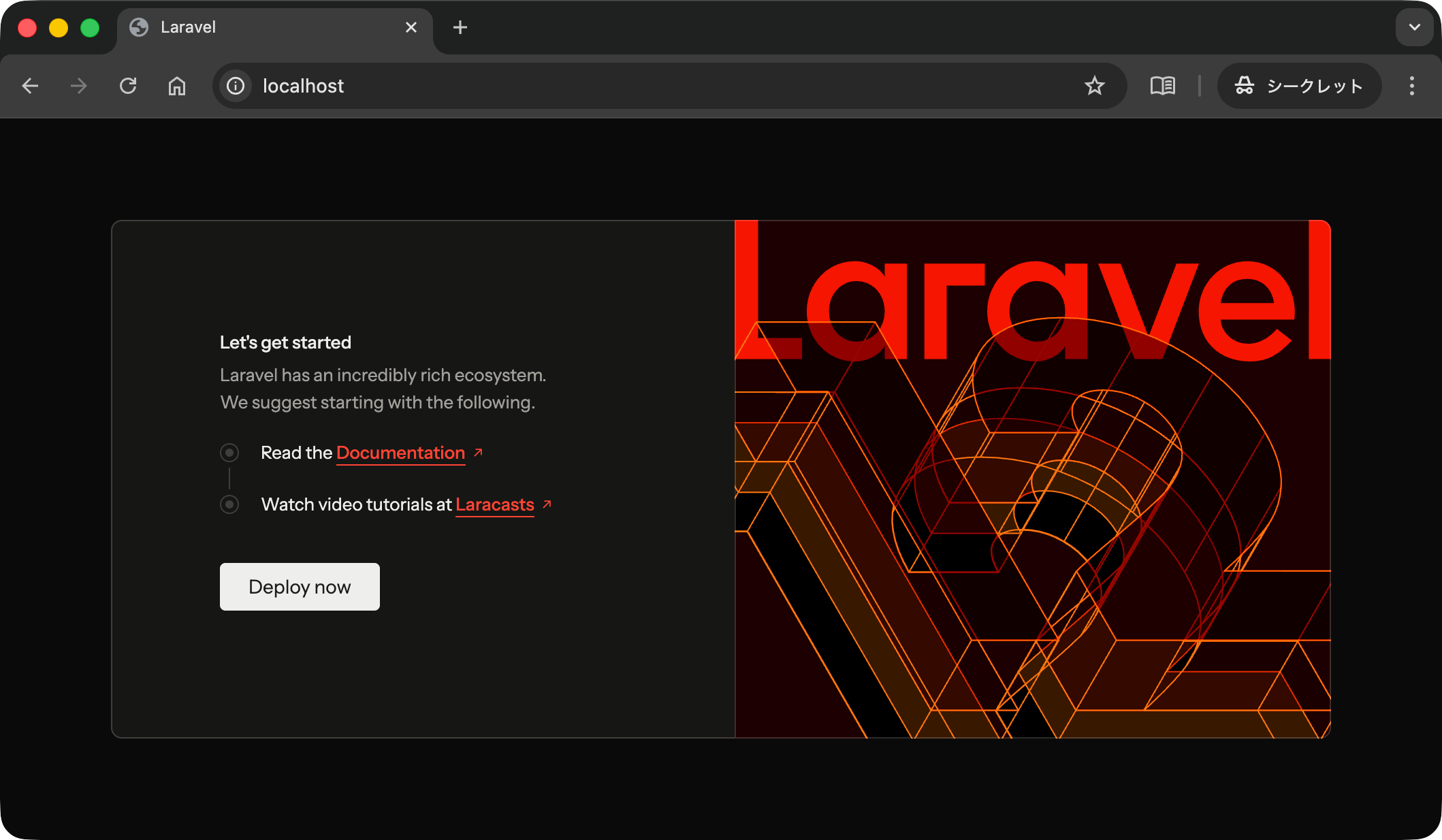
開発環境が起動できたので,http://localhost/ に接続するとアプリケーションのトップページが表示されるはずです.
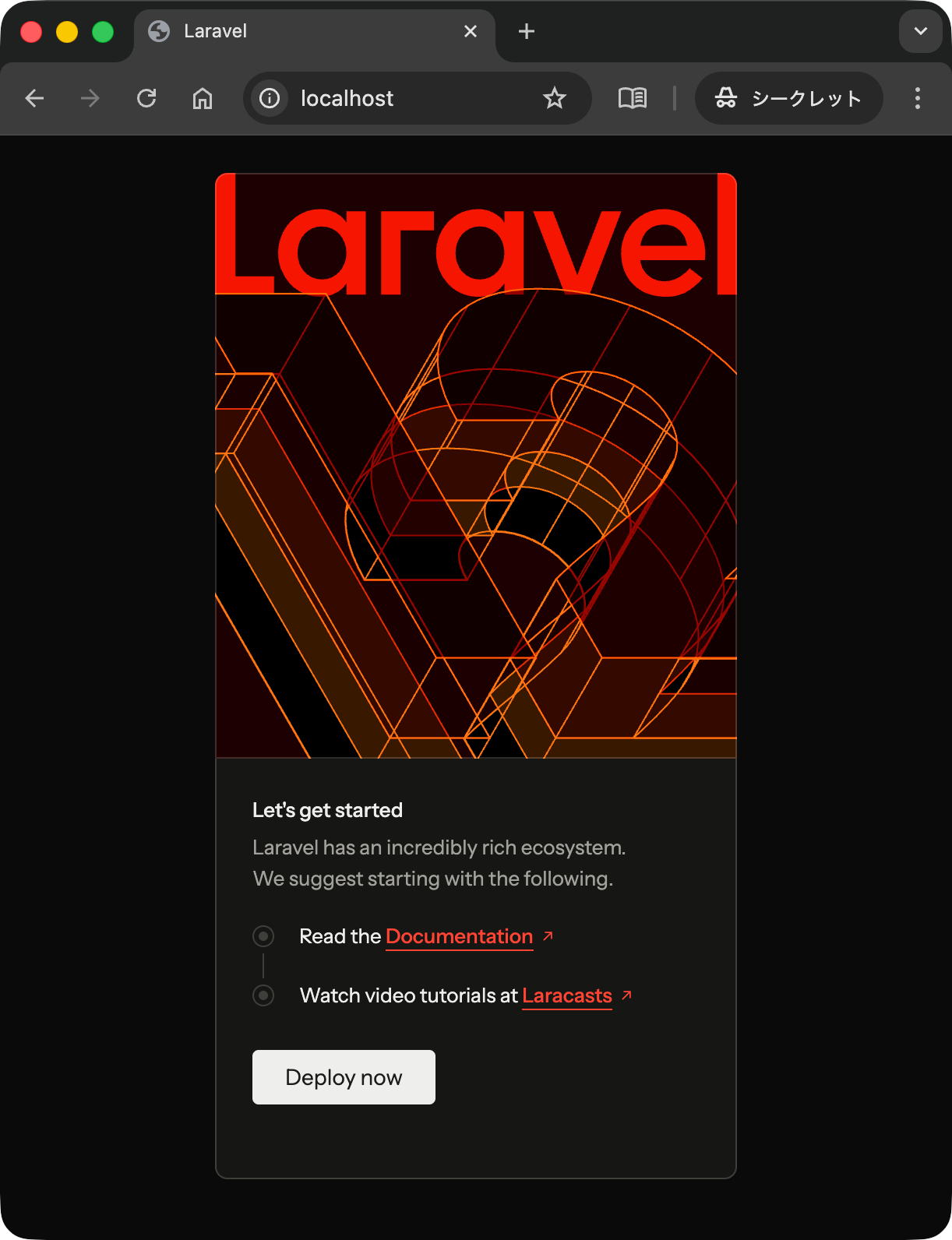
Laravel のトップページは Tailwind.css で記述されており,レスポンシブ Web デザインを利用可能です.例えば Web ブラウザの画面横幅が小さくなると次のようなレイアウトになることを確認してください.
開発環境を終了するには次のコマンドを実行します.
laravel-comment-app-2025 % ./vendor/bin/sail down ⏎
[+] Running 7/6
 ✔ Container laravel-comment-app-2025-laravel.test-1  Removed         1.0s
 ✔ Container laravel-comment-app-2025-mysql-1         Removed         1.0s
 ✔ Container laravel-comment-app-2025-meilisearch-1   Removed         0.1s
 ✔ Container laravel-comment-app-2025-selenium-1      Removed         4.6s
 ✔ Container laravel-comment-app-2025-mailpit-1       Removed         0.4s
 ✔ Container laravel-comment-app-2025-redis-1         Removed         0.2s
 ✔ Network laravel-comment-app-2025_sail              Removed         0.1s
laravel-comment-app-2025 %
なお,./vendor/bin/sail up -d というコマンドによって,いくつかの Docker コンテナが起動します.つまり,このコマンドは Docker の docker compnose up -d コマンドと(ほぼ)同じ処理が実行されるので,実は次のコマンドでも開発環境を起動できます.
laravel-comment-app-2025 % docker compose up -d ⏎
[+] Running 7/7
 ✔ Network laravel-comment-app-2025_sail              Created         0.0s
 ✔ Container laravel-comment-app-2025-mysql-1         Started         0.4s
 ✔ Container laravel-comment-app-2025-redis-1         Started         0.3s
 ✔ Container laravel-comment-app-2025-meilisearch-1   Started         0.3s
 ✔ Container laravel-comment-app-2025-mailpit-1       Started         0.4s
 ✔ Container laravel-comment-app-2025-selenium-1      Started         0.3s
 ✔ Container laravel-comment-app-2025-laravel.test-1  Started         0.4s
laravel-comment-app-2025 %
同じように終了コマンドも docker compose down や docker compose stop コマンドが使えます.
laravel-comment-app-2025 % docker compose down ⏎
[+] Running 7/7
 ✔ Container laravel-comment-app-2025-laravel.test-1  Removed         0.7s
 ✔ Container laravel-comment-app-2025-meilisearch-1   Removed         0.1s
 ✔ Container laravel-comment-app-2025-mysql-1         Removed         1.0s
 ✔ Container laravel-comment-app-2025-redis-1         Removed         0.2s
 ✔ Container laravel-comment-app-2025-mailpit-1       Removed         0.4s
 ✔ Container laravel-comment-app-2025-selenium-1      Removed         4.4s
 ✔ Network laravel-comment-app-2025_sail              Removed         0.1s
laravel-comment-app-2025 %
artian コマンドの実行
Laravel 10 の説明ページでは php artisan ... の各種コマンドを利用しました.仮想環境上で利用していた php artisan コマンドが Sail による開発環境では ./vendor/bin/sail artisan コマンドになることを理解すれば,Laravel 10 の説明ページ とほぼ同じ流れで Laravel 12 でも開発を行うことができます.ただし,Validation の書き方が変更されていることには注意してください.Laravel 12 の Validation についての詳細はここで確認してください.
まず,artisan のバージョンを確認しますが,Sail が起動していない状態(つまり,Docker コンテナが起動していない状態)では実行できません.
laravel-comment-app-2025 % ./vendor/bin/sail artisan --version ⏎
Sail is not running.

You may Sail using the following commands: './vendor/bin/sail up' or './vendor/bin/sail up -d'
laravel-comment-app-2025 %
Sail を起動(つまり Docker コンテナを起動)します.
laravel-comment-app-2025 % ./vendor/bin/sail up -d ⏎
[+] Running 6/6
 ✔ Container laravel-comment-app-2025-selenium-1      Started                       0.2s
 ✔ Container laravel-comment-app-2025-mysql-1         Started                       0.2s
 ✔ Container laravel-comment-app-2025-meilisearch-1   Started                       0.2s
 ✔ Container laravel-comment-app-2025-mailpit-1       Started                       0.2s
 ✔ Container laravel-comment-app-2025-redis-1         Started                       0.2s
 ✔ Container laravel-comment-app-2025-laravel.test-1  Started                       0.3s
laravel-comment-app-2025 %
Docker コンテナの起動状態を確認します.
laravel-comment-app-2025 % docker container ls ⏎
CONTAINER ID   IMAGE                            COMMAND                   CREATED              STATUS                        PORTS                                                      NAMES
792d0c4fbd59   sail-8.4/app                     "start-container"         About a minute ago   Up About a minute             0.0.0.0:80->80/tcp, 0.0.0.0:5173->5173/tcp                 laravel-comment-app-2025-laravel.test-1
ffa386dd5948   selenium/standalone-chromium     "/opt/bin/entry_poin…"   About a minute ago   Up About a minute             4444/tcp, 5900/tcp, 9000/tcp                               laravel-comment-app-2025-selenium-1
0c0f6e65346f   redis:alpine                     "docker-entrypoint.s…"   About a minute ago   Up About a minute (healthy)   0.0.0.0:6379->6379/tcp                                     laravel-comment-app-2025-redis-1
998622f56fa7   getmeili/meilisearch:latest      "tini -- /bin/sh -c …"   About a minute ago   Up About a minute (healthy)   0.0.0.0:7700->7700/tcp                                     laravel-comment-app-2025-meilisearch-1
7adbad63ef91   laravel-comment-app-2025-mysql   "docker-entrypoint.s…"   About a minute ago   Up About a minute (healthy)   0.0.0.0:3306->3306/tcp, 33060/tcp                          laravel-comment-app-2025-mysql-1
81f218e08131   axllent/mailpit:latest           "/mailpit"                About a minute ago   Up About a minute (healthy)   0.0.0.0:1025->1025/tcp, 0.0.0.0:8025->8025/tcp, 1110/tcp   laravel-comment-app-2025-mailpit-1
laravel-comment-app-2025 %
コンテナの起動が確認できたので,artisan のバージョンを確認します.
laravel-comment-app-2025 % ./vendor/bin/sail artisan --version ⏎
Laravel Framework 12.34.0
laravel-comment-app-2025 %
マイグレーションの実行状況を確認します.まだマイグレーションを実行していないので,次のような結果になります.なお,Sail で環境を構築すると,MySQL のコンテナが起動し,その MySQL コンテナに接続することになります.
laravel-comment-app-2025 % ./vendor/bin/sail artisan migrate:status ⏎

   ERROR  Migration table not found.

laravel-comment-app-2025 %
マイグレーションを実行してデータベースにテーブルを生成します.
laravel-comment-app-2025 % ./vendor/bin/sail artisan migrate ⏎

   INFO  Preparing database.

  Creating migration table ........................ 13.54ms DONE

   INFO  Running migrations.

  0001_01_01_000000_create_users_table ............ 74.68ms DONE
  0001_01_01_000001_create_cache_table ............ 15.11ms DONE
  0001_01_01_000002_create_jobs_table ............. 38.15ms DONE

laravel-comment-app-2025 %
データベースへの接続方法
Sail 開発環境で MySQL データベースに接続するときにも ./vendor/bin/sail コマンドが利用できます.具体的には次のとおりです.
laravel-comment-app-2025 % ./vendor/bin/sail mysql ⏎  # (1) mysql サービス(コンテナ)に接続してmysqlにログイン
Reading table information for completion of table and column names
You can turn off this feature to get a quicker startup with -A

Welcome to the MySQL monitor.  Commands end with ; or \g.
Your MySQL connection id is 504
Server version: 8.0.32 MySQL Community Server - GPL

Copyright (c) 2000, 2023, Oracle and/or its affiliates.

Oracle is a registered trademark of Oracle Corporation and/or its
affiliates. Other names may be trademarks of their respective
owners.

Type 'help;' or '\h' for help. Type '\c' to clear the current input statement.

mysql> SELECT USER(); ⏎  # (2) 接続中のユーザ名を確認
+----------------+
| USER()         |
+----------------+
| sail@localhost |
+----------------+
1 row in set (0.00 sec)

mysql> SELECT DATABASE(); ⏎  # (3) 接続中のデータベース名を確認
+------------+
| DATABASE() |
+------------+
| laravel    |
+------------+
1 row in set (0.00 sec)

mysql> SHOW DATABASES; ⏎  # (4) データベースの一覧を確認
+--------------------+
| Database           |
+--------------------+
| information_schema |
| laravel            |
| performance_schema |
| testing            |
+--------------------+
4 rows in set (0.00 sec)

mysql> SHOW TABLES; ⏎  # (5) テーブルの一覧を確認
+-----------------------+
| Tables_in_laravel     |
+-----------------------+
| cache                 |
| cache_locks           |
| failed_jobs           |
| job_batches           |
| jobs                  |
| migrations            |
| password_reset_tokens |
| sessions              |
| users                 |
+-----------------------+
9 rows in set (0.01 sec)

mysql> SHOW VARIABLES LIKE "character_set%"; ⏎  # (6) MySQL の文字コード設定を確認
+--------------------------+--------------------------------+
| Variable_name            | Value                          |
+--------------------------+--------------------------------+
| character_set_client     | latin1                         |
| character_set_connection | latin1                         |
| character_set_database   | utf8mb4                        |
| character_set_filesystem | binary                         |
| character_set_results    | latin1                         |
| character_set_server     | utf8mb4                        |
| character_set_system     | utf8mb3                        |
| character_sets_dir       | /usr/share/mysql-8.0/charsets/ |
+--------------------------+--------------------------------+
8 rows in set (0.02 sec)

mysql> exit ⏎  # (7) mysql とコンテナからログアウト
Bye
laravel-comment-app-2025 %
上の (1) では mysql サービス(これは compose.yml ファイルに記載されたサービス名)に対応するコンテナに接続するとともに,mysql にログインしています.このとき,次の.env ファイルに記載されたユーザ名 (sail) とパスワード (password) を利用し,データベース (laravel) に接続していることになります.(2) では接続中のユーザ名が sail ユーザでであることを確認しています.(3) でも接続中のデータベース名が laravel であることを確認しています.(4) では sail ユーザが利用可能なデータベースの一覧を確認しています.(5) では現在利用中の laravel データベースに生成されているテーブルを一覧で確認しています.この生成は上のステップですでに実行されています.(6) ではMySQL データベースの文字コード設定を確認しています.この結果のいくつかに latin1 が利用されていることが分かります.この設定では日本語文字列をデータベースに登録したとき,文字化けを起こす可能性があります.この問題は後のステップで解消しましょう.(7) ではmysqlからログアウトし,コンテナからもログアウトしています.
.env(抜粋)
DB_CONNECTION=mysql
DB_HOST=mysql
DB_PORT=3306
DB_DATABASE=laravel
DB_USERNAME=sail
DB_PASSWORD=password
次に,docker compose コマンドでコンテナのシェルにログインした後,mysql へ接続する方法も確認します.次のとおり,(1) で mysql サービス(コンテナ)の /bin/bash シェルにログインします.その後,(2) では sail ユーザで mysql に接続し,laravel データベースを開きます.(3) ではパスワードを入力しますが,入力内容が画面には表示されないので注意してください.なお,ユーザ名とパスワードは .env ファイルに記載された内容が設定されています.その後の(4)〜(7)は上での操作と同じです.(8) では mysql データベースからログアウトし,(9) ではコンテナのシェルからログアウトしています.
laravel-comment-app-2025 % docker compose exec mysql /bin/bash ⏎  # (1)
WARN[0000] The "WWWUSER" variable is not set. Defaulting to a blank string.
WARN[0000] The "WWWGROUP" variable is not set. Defaulting to a blank string.
bash-4.4# mysql -u sail -p laravel ⏎  # (2)
Enter password:  ⏎  # (3)
Reading table information for completion of table and column names
You can turn off this feature to get a quicker startup with -A

Welcome to the MySQL monitor.  Commands end with ; or \g.
Your MySQL connection id is 521
Server version: 8.0.32 MySQL Community Server - GPL

Copyright (c) 2000, 2023, Oracle and/or its affiliates.

Oracle is a registered trademark of Oracle Corporation and/or its
affiliates. Other names may be trademarks of their respective
owners.

Type 'help;' or '\h' for help. Type '\c' to clear the current input statement.

mysql> SELECT USER(); ⏎  # (4)
+----------------+
| USER()         |
+----------------+
| sail@localhost |
+----------------+
1 row in set (0.00 sec)

mysql> SELECT DATABASE(); ⏎  # (5)
+------------+
| DATABASE() |
+------------+
| laravel    |
+------------+
1 row in set (0.00 sec)

mysql> SHOW DATABASES; ⏎  # (6)
+--------------------+
| Database           |
+--------------------+
| information_schema |
| laravel            |
| performance_schema |
| testing            |
+--------------------+
4 rows in set (0.00 sec)

mysql> SHOW TABLES; ⏎  # (7)
+-----------------------+
| Tables_in_laravel     |
+-----------------------+
| cache                 |
| cache_locks           |
| failed_jobs           |
| job_batches           |
| jobs                  |
| migrations            |
| password_reset_tokens |
| sessions              |
| users                 |
+-----------------------+
9 rows in set (0.00 sec)

mysql> exit ⏎  # (8)
Bye
bash-4.4# exit ⏎  # (9)
exit
laravel-comment-app-2025 %
なお,次の (2) でデータベース名を指定せずに mysql にログインしています.この場合は (7) ように USE コマンドでデータベースを変更する必要があります.
laravel-comment-app-2025 % docker compose exec mysql /bin/bash ⏎  # (1)
WARN[0000] The "WWWUSER" variable is not set. Defaulting to a blank string.
WARN[0000] The "WWWGROUP" variable is not set. Defaulting to a blank string.
bash-4.4# mysql -u sail -p ⏎  # (2)
Enter password: ⏎  # (3)
Welcome to the MySQL monitor.  Commands end with ; or \g.
Your MySQL connection id is 526
Server version: 8.0.32 MySQL Community Server - GPL

Copyright (c) 2000, 2023, Oracle and/or its affiliates.

Oracle is a registered trademark of Oracle Corporation and/or its
affiliates. Other names may be trademarks of their respective
owners.

Type 'help;' or '\h' for help. Type '\c' to clear the current input statement.

mysql> SELECT USER(); ⏎  # (4)
+----------------+
| USER()         |
+----------------+
| sail@localhost |
+----------------+
1 row in set (0.00 sec)

mysql> SELECT DATABASE(); ⏎  # (5)
+------------+
| DATABASE() |
+------------+
| NULL       |
+------------+
1 row in set (0.00 sec)

mysql> SHOW DATABASES; ⏎  # (6)
+--------------------+
| Database           |
+--------------------+
| information_schema |
| laravel            |
| performance_schema |
| testing            |
+--------------------+
4 rows in set (0.01 sec)

mysql> USE laravel; ⏎  # (7)
Reading table information for completion of table and column names
You can turn off this feature to get a quicker startup with -A

Database changed
mysql> SELECT DATABASE(); ⏎  # (8)
+------------+
| DATABASE() |
+------------+
| laravel    |
+------------+
1 row in set (0.00 sec)

mysql> SHOW TABLES; ⏎  # (9)
+-----------------------+
| Tables_in_laravel     |
+-----------------------+
| cache                 |
| cache_locks           |
| failed_jobs           |
| job_batches           |
| jobs                  |
| migrations            |
| password_reset_tokens |
| sessions              |
| users                 |
+-----------------------+
9 rows in set (0.00 sec)

mysql> exit ⏎  # (10)
Bye
bash-4.4# exit ⏎  # (11)
exit
laravel-comment-app-2025 %
さらに,mysql に root ユーザでログインすることも可能です.通常は root ユーザとその他のユーザでは別のパスワードを設定すべきですが,Sail はあくまで開発環境であることを考えると大きな問題にはならないでしょう.ユーザ root でログインした場合は,(6) でアクセス権限のあるデータベースが増えていることに注意してください.
laravel-comment-app-2025 % docker compose exec mysql /bin/bash ⏎  # (1)
WARN[0000] The "WWWUSER" variable is not set. Defaulting to a blank string.
WARN[0000] The "WWWGROUP" variable is not set. Defaulting to a blank string.
bash-4.4# mysql -u root -p ⏎  # (2)
Enter password: ⏎  # (3)
Welcome to the MySQL monitor.  Commands end with ; or \g.
Your MySQL connection id is 532
Server version: 8.0.32 MySQL Community Server - GPL

Copyright (c) 2000, 2023, Oracle and/or its affiliates.

Oracle is a registered trademark of Oracle Corporation and/or its
affiliates. Other names may be trademarks of their respective
owners.

Type 'help;' or '\h' for help. Type '\c' to clear the current input statement.

mysql> SELECT USER(); ⏎  # (4)
+----------------+
| USER()         |
+----------------+
| root@localhost |
+----------------+
1 row in set (0.01 sec)

mysql> SELECT DATABASE(); ⏎  # (5)
+------------+
| DATABASE() |
+------------+
| NULL       |
+------------+
1 row in set (0.00 sec)

mysql> SHOW DATABASES; ⏎  # (6)
+--------------------+
| Database           |
+--------------------+
| information_schema |
| laravel            |
| mysql              |
| performance_schema |
| sys                |
| testing            |
+--------------------+
6 rows in set (0.01 sec)

mysql> USE laravel; ⏎  # (7)
Reading table information for completion of table and column names
You can turn off this feature to get a quicker startup with -A

Database changed
mysql> SELECT DATABASE(); ⏎  # (8)
+------------+
| DATABASE() |
+------------+
| laravel    |
+------------+
1 row in set (0.00 sec)

mysql> SHOW TABLES; ⏎  # (9)
+-----------------------+
| Tables_in_laravel     |
+-----------------------+
| cache                 |
| cache_locks           |
| failed_jobs           |
| job_batches           |
| jobs                  |
| migrations            |
| password_reset_tokens |
| sessions              |
| users                 |
+-----------------------+
9 rows in set (0.00 sec)

mysql> exit ⏎  # (10)
Bye
bash-4.4# exit ⏎  # (11)
exit
laravel-comment-app-2025 %
MYSQL_EXTRA_OPTIONS 警告への対応
次のとおり,sail コマンドを実行すると,MYSQL_EXTRA_OPTIONS 変数に関する警告が表示されているかもしれません.
laravel-comment-app-2025 % ./vendor/bin/sail artisan --version ⏎
WARN[0000] The "MYSQL_EXTRA_OPTIONS" variable is not set. Defaulting to a blank string.
WARN[0000] The "MYSQL_EXTRA_OPTIONS" variable is not set. Defaulting to a blank string.
Laravel Framework 12.34.0
laravel-comment-app-2025 %
その場合,.env ファイルに次の行を追加すると良いでしょう.
.env(抜粋)
MYSQL_EXTRA_OPTIONS=""
もう一度 sail コマンドを実行すると,今度は警告が表示されなくなりました.
laravel-comment-app-2025 % ./vendor/bin/sail artisan --version ⏎
Laravel Framework 12.34.0
laravel-comment-app-2025 %
データベースにテストデータを投入するまで
Sail の標準設定で MySQL を利用すると,日本語文字列に文字化けが発生します.具体的には,MySQL データベースから取得した文字列を Web ページに表示する部分では問題はありませんが,シェルから MySQL に接続して SQL コマンドを実行したときなどで文字化けが発生します.この問題を解決するために,データベースにテストデータを投入するまでの開発作業を行います.
まず,アプリケーションのロケールを設定します.これは,.env ファイルを次のとおり編集します.
.env(抜粋)
APP_LOCALE=ja
APP_FALLBACK_LOCALE=en
APP_FAKER_LOCALE=ja_JP
タイムゾーンを設定します.これは config/app.php を次のとおり編集します.
config/app.php(抜粋)
/*
|--------------------------------------------------------------------------
| Application Timezone
|--------------------------------------------------------------------------
|
| Here you may specify the default timezone for your application, which
| will be used by the PHP date and date-time functions. The timezone
| is set to "UTC" by default as it is suitable for most use cases.
|
*/
'timezone' => 'Asia/Tokyo',
データベースに comments テーブルを定義するためのマイグレーションファイルを生成します.
laravel-comment-app-2025 % ./vendor/bin/sail artisan make:migration create_comments_table --create=comments ⏎

   INFO  Migration [database/migrations/2025_10_19_110214_create_comments_table.php] created successfully.

laravel-comment-app-2025 %
生成されたマイグレーションファイルを編集し,comments テーブルの設計を行います.
database/migrations/yyyy_mm_dd_hhmmss_create_comments_table.php
<?php
use Illuminate\Database\Migrations\Migration;
use Illuminate\Database\Schema\Blueprint;
use Illuminate\Support\Facades\Schema;
return new class extends Migration
{
/**
* Run the migrations.
*/
public function up(): void
{
Schema::create('comments', function (Blueprint $table) {
$table->id();
$table->string('title', 255);
$table->text('body');
$table->timestamps();
});
}
/**
* Reverse the migrations.
*/
public function down(): void
{
Schema::dropIfExists('comments');
}
};
マイグレーションの実行状況を確認します.さきほど生成したマイグレーションファイルはまだ実行されていないことが分かります.
laravel-comment-app-2025 % ./vendor/bin/sail artisan migrate:status ⏎

  Migration name ........................................ Batch / Status
  0001_01_01_000000_create_users_table ......................... [1] Ran
  0001_01_01_000001_create_cache_table ......................... [1] Ran
  0001_01_01_000002_create_jobs_table .......................... [1] Ran
  2025_10_19_110214_create_comments_table ...................... Pending

laravel-comment-app-2025 %
次のコマンドでデータベースにテーブルを生成します.
laravel-comment-app-2025 % ./vendor/bin/sail artisan migrate ⏎

   INFO  Running migrations.

  2025_10_19_110214_create_comments_table ................. 10.65ms DONE

laravel-comment-app-2025 %
次にテストデータをデータベースに投入するためのシーダーを生成します.
laravel-comment-app-2025 % ./vendor/bin/sail artisan make:seeder CommentsTableSeeder ⏎

   INFO  Seeder [database/seeders/CommentsTableSeeder.php] created successfully.

laravel-comment-app-2025 %
生成されたシーダにテストデータを設定します.
database/seeders/CommentsTableSeeder.php
<?php
namespace Database\Seeders;
use Illuminate\Database\Console\Seeds\WithoutModelEvents;
use Illuminate\Database\Seeder;
use Illuminate\Support\Facades\DB;
class CommentsTableSeeder extends Seeder
{
/**
* Run the database seeds.
*/
public function run(): void
{
// 一旦中身を削除する
DB::table('comments')->delete();
DB::table('comments')->insert([
'title' => '最初のコメント',
'body' => '最初のコメントです!'
]);
DB::table('comments')->insert([
'title' => '2つ目',
'body' => '2つ目のコメントです!'
]);
DB::table('comments')->insert([
'title' => '<三個目>のコメント',
'body' => 'シーダによってテストデータを設定します.'
]);
}
}
シーダの実行時に comments テーブルのシーダも同時に実行されるようにします.
database/seeders/DatabaseSeeder.php
<?php
namespace Database\Seeders;
use App\Models\User;
use Illuminate\Database\Console\Seeds\WithoutModelEvents;
use Illuminate\Database\Seeder;
class DatabaseSeeder extends Seeder
{
use WithoutModelEvents;
/**
* Seed the application's database.
*/
public function run(): void
{
// User::factory(10)->create();
User::factory()->create([
'name' => 'Test User',
'email' => 'test@example.com',
]);
$this->call(CommentsTableSeeder::class);
}
}
次のコマンドを実行するとテーブルにテストデータが投入されます.
laravel-comment-app-2025 % ./vendor/bin/sail artisan db:seed ⏎

   INFO  Seeding database.

  Database\Seeders\CommentsTableSeeder ......................... RUNNING
  Database\Seeders\CommentsTableSeeder ....................... 4 ms DONE

laravel-comment-app-2025 %
テストデータの設定ができたので,MySQL に接続して,データが登録されていること,さらに文字化けが起こることを確認しておきます.具体的には,(1) で mysql に接続し,(2) では comments テーブルが生成されていることを確認します.(3) は comments テーブルの定義を確認しています.(4) では comments テーブルのデータを検索していますが,文字化けしていることが分かります.その原因は (5) の結果で示された文字コードのいくつかが latin1 になっていることです.
laravel-comment-app-2025 % ./vendor/bin/sail mysql ⏎  # (1)
Reading table information for completion of table and column names
You can turn off this feature to get a quicker startup with -A

Welcome to the MySQL monitor.  Commands end with ; or \g.
Your MySQL connection id is 64
Server version: 8.0.32 MySQL Community Server - GPL

Copyright (c) 2000, 2023, Oracle and/or its affiliates.

Oracle is a registered trademark of Oracle Corporation and/or its
affiliates. Other names may be trademarks of their respective
owners.

Type 'help;' or '\h' for help. Type '\c' to clear the current input statement.

mysql> SHOW TABLES; ⏎  # (2)
+-----------------------+
| Tables_in_laravel     |
+-----------------------+
| cache                 |
| cache_locks           |
| comments              |
| failed_jobs           |
| job_batches           |
| jobs                  |
| migrations            |
| password_reset_tokens |
| sessions              |
| users                 |
+-----------------------+
10 rows in set (0.00 sec)

mysql> DESC comments; ⏎  # (3)
+------------+-----------------+------+-----+---------+----------------+
| Field      | Type            | Null | Key | Default | Extra          |
+------------+-----------------+------+-----+---------+----------------+
| id         | bigint unsigned | NO   | PRI | NULL    | auto_increment |
| title      | varchar(255)    | NO   |     | NULL    |                |
| body       | text            | NO   |     | NULL    |                |
| created_at | timestamp       | YES  |     | NULL    |                |
| updated_at | timestamp       | YES  |     | NULL    |                |
+------------+-----------------+------+-----+---------+----------------+
5 rows in set (0.01 sec)

mysql> SELECT * FROM comments; ⏎  # (4)
+----+------------+----------------------+------------+------------+
| id | title      | body                 | created_at | updated_at |
+----+------------+----------------------+------------+------------+
|  1 | ???????    | ??????????           | NULL       | NULL       |
|  2 | 2??        | 2??????????          | NULL       | NULL       |
|  3 | <???>????? | ???????????????????? | NULL       | NULL       |
+----+------------+----------------------+------------+------------+
3 rows in set (0.00 sec)

mysql> SHOW VARIABLES LIKE "character_set%"; ⏎  # (5)
+--------------------------+--------------------------------+
| Variable_name            | Value                          |
+--------------------------+--------------------------------+
| character_set_client     | latin1                         |
| character_set_connection | latin1                         |
| character_set_database   | utf8mb4                        |
| character_set_filesystem | binary                         |
| character_set_results    | latin1                         |
| character_set_server     | utf8mb4                        |
| character_set_system     | utf8mb3                        |
| character_sets_dir       | /usr/share/mysql-8.0/charsets/ |
+--------------------------+--------------------------------+
8 rows in set (0.00 sec)

mysql> exit ⏎  # (6) mysql とコンテナからログアウト
Bye
laravel-comment-app-2025 %
MySQL の文字化けを解消する
任意のバージョンを指定して利用したい MySQL のイメージを指定します.なお,Laravel 12 の標準では 8.0 です.ここで利用しているようにバージョン9系を指定しても良いでしょう.
.env(抜粋)
# MySQL
# MYSQL_IMAGE=arm64v8/mysql:8.4
MYSQL_IMAGE=mysql:8.4
次に Docker イメージをビルドするための Dockerfile を database フォルダに設置します.
database/Dockerfile
ARG IMAGE
FROM ${IMAGE}
RUN microdnf install -y glibc-locale-source glibc-langpack-en && \
microdnf clean all
RUN localedef -f UTF-8 -i ja_JP ja_JP.UTF-8
ENV LANG="ja_JP.UTF-8" \
LANGUAGE="ja_JP:ja" \
LC_ALL="ja_JP.UTF-8"
さらに,compose.yml の mysql サービスに関する箇所を編集し,Docker イメージに対するビルドの記述を追加します.また,ベースとなる Docker イメージのビルドを Dockerfile にて指示することから,当初利用していた Docker イメージの指定は削除するかコメントアウトします.ここで,.env の MYSQL_IMAGE で指定された値が compose.yml で読み込まれ,その値が IMAGE 引数として Dockerfile に渡されていることに注意してください.
compose.yml
services:
laravel.test:
build:
...(中略)...
mysql:
build:
context: .
dockerfile: ./database/Dockerfile
args:
IMAGE: ${MYSQL_IMAGE}
# image: 'mysql/mysql-server:8.0'
ports:
- '${FORWARD_DB_PORT:-3306}:3306'
environment:
MYSQL_ROOT_PASSWORD: '${DB_PASSWORD}'
MYSQL_ROOT_HOST: '%'
MYSQL_DATABASE: '${DB_DATABASE}'
MYSQL_USER: '${DB_USERNAME}'
MYSQL_PASSWORD: '${DB_PASSWORD}'
MYSQL_ALLOW_EMPTY_PASSWORD: 1
MYSQL_EXTRA_OPTIONS: '${MYSQL_EXTRA_OPTIONS}'
volumes:
- 'sail-mysql:/var/lib/mysql'
- './vendor/laravel/sail/database/mysql/create-testing-database.sh:/docker-entrypoint-initdb.d/10-create-testing-database.sh'
networks:
- sail
healthcheck:
test:
- CMD
- mysqladmin
- ping
- '-p${DB_PASSWORD}'
retries: 3
timeout: 5s
redis:
...(以下略)...
compose.yml, Dockerfile, .env といったファイルの準備ができたら,一旦Sail を停止します.
laravel-comment-app-2025 % ./vendor/bin/sail down ⏎
[+] Running 7/6
 ✔ Container laravel-comment-app-2025-laravel.test-1  Removed              0.2s
 ✔ Container laravel-comment-app-2025-mysql-1         Removed              1.5s
 ✔ Container laravel-comment-app-2025-mailpit-1       Removed              0.4s
 ✔ Container laravel-comment-app-2025-selenium-1      Removed              4.3s
 ✔ Container laravel-comment-app-2025-meilisearch-1   Removed              0.1s
 ✔ Container laravel-comment-app-2025-redis-1         Removed              0.2s
 ✔ Network laravel-comment-app-2025_sail              Removed              0.0s
laravel-comment-app-2025 %
再び Sail を起動しますが,Dockefile を使って新たな mysql イメージを生成するように --build オプションも追加して実行します.
laravel-comment-app-2025 % ./vendor/bin/sail up -d --build ⏎
[+] Running 0/0
[+] Running 0/1l  Building                                                 0.1s
[+] Building 1.8s (2/2)                                    docker:desktop-linux
[+] Building 3.1s (28/28) FINISHED                         docker:desktop-linux
 => [mysql internal] load build definition from Dockerfile                 0.0s
 => => transferring dockerfile: 313B                                       0.0s
 => WARN: InvalidDefaultArgInFrom: Default value for ARG ${IMAGE} results  0.0s
 => [mysql internal] load metadata for docker.io/library/mysql:8.4         1.8s
 => [mysql internal] load .dockerignore                                    0.0s
 => => transferring context: 2B                                            0.0s
 => [mysql 1/3] FROM docker.io/library/mysql:8.4@sha256:b306273d4d36bc1a7  0.0s
 => CACHED [mysql 2/3] RUN microdnf install -y glibc-locale-source glibc-  0.0s
 => CACHED [mysql 3/3] RUN localedef -f UTF-8 -i ja_JP ja_JP.UTF-8         0.0s
 => [mysql] exporting to image                                             0.0s
 => => exporting layers                                                    0.0s
 => => writing image sha256:9b758cc8b6a3bae242ac780b61564229f7c19d5238e03  0.0s
 => => naming to docker.io/library/laravel-comment-app-2025-mysql          0.0s
 => [mysql] resolving provenance for metadata file                         0.0s
 => [laravel.test internal] load build definition from Dockerfile          0.0s
 => => transferring dockerfile: 3.71kB                                     0.0s
 => [laravel.test internal] load metadata for docker.io/library/ubuntu:24  1.1s
 => [laravel.test internal] load .dockerignore                             0.0s
 => => transferring context: 2B                                            0.0s
 => [laravel.test  1/14] FROM docker.io/library/ubuntu:24.04@sha256:66460  0.0s
 => [laravel.test internal] load build context                             0.0s
 => => transferring context: 99B                                           0.0s
 => CACHED [laravel.test  2/14] WORKDIR /var/www/html                      0.0s
 => CACHED [laravel.test  3/14] RUN ln -snf /usr/share/zoneinfo/UTC /etc/  0.0s
 => CACHED [laravel.test  4/14] RUN echo "Acquire::http::Pipeline-Depth 0  0.0s
 => CACHED [laravel.test  5/14] RUN apt-get update && apt-get upgrade -y   0.0s
 => CACHED [laravel.test  6/14] RUN setcap "cap_net_bind_service=+ep" /us  0.0s
 => CACHED [laravel.test  7/14] RUN userdel -r ubuntu                      0.0s
 => CACHED [laravel.test  8/14] RUN groupadd --force -g 20 sail            0.0s
 => CACHED [laravel.test  9/14] RUN useradd -ms /bin/bash --no-user-group  0.0s
 => CACHED [laravel.test 10/14] RUN git config --global --add safe.direct  0.0s
 => CACHED [laravel.test 11/14] COPY start-container /usr/local/bin/start  0.0s
 => CACHED [laravel.test 12/14] COPY supervisord.conf /etc/supervisor/con  0.0s
 => CACHED [laravel.test 13/14] COPY php.ini /etc/php/8.4/cli/conf.d/99-s  0.0s
 => CACHED [laravel.test 14/14] RUN chmod +x /usr/local/bin/start-contain  0.0s
 => [laravel.test] exporting to image                                      0.0s
 => => exporting layers                                                    0.0s
[+] Running 8/8image sha256:a42bdbac4d40e8ea1e636ec0c065aadb073a49d3f40de  0.0s
 ✔ Service mysql                                      B...                 1.9s
 ✔ Service laravel.test                               Built                1.3s
 ✔ Container laravel-comment-app-2025-selenium-1      Started              0.4s
 ✔ Container laravel-comment-app-2025-mailpit-1       Started              0.4s
 ✔ Container laravel-comment-app-2025-redis-1         Started              0.3s
 ✔ Container laravel-comment-app-2025-meilisearch-1   Started              0.3s
 ✔ Container laravel-comment-app-2025-laravel.test-1  Started              0.5s
 ✔ Container laravel-comment-app-2025-mysql-1         Started              0.3s
laravel-comment-app-2025 %
MySQL にログインしていくつかのコマンドを入力します.(1) のログイン後に表示されるバージョン番号が .env に記載したバージョンになっていることを確認します.(2) では文字コード設定を確認しています.以前は latin1 であった箇所が utfmb4 に変化していることに注意してください.この結果,(3) の検索では日本語文字列が文字化けすることなく表示できるようになりました.
laravel-comment-app-2025 % ./vendor/bin/sail mysql ⏎  # (1)
Reading table information for completion of table and column names
You can turn off this feature to get a quicker startup with -A

Welcome to the MySQL monitor.  Commands end with ; or \g.
Your MySQL connection id is 26
Server version: 8.4.7 MySQL Community Server - GPL

Copyright (c) 2000, 2025, Oracle and/or its affiliates.

Oracle is a registered trademark of Oracle Corporation and/or its
affiliates. Other names may be trademarks of their respective
owners.

Type 'help;' or '\h' for help. Type '\c' to clear the current input statement.

mysql> SHOW VARIABLES LIKE "character_set%"; ⏎  # (2)
+--------------------------+--------------------------------+
| Variable_name            | Value                          |
+--------------------------+--------------------------------+
| character_set_client     | utf8mb4                        |
| character_set_connection | utf8mb4                        |
| character_set_database   | utf8mb4                        |
| character_set_filesystem | binary                         |
| character_set_results    | utf8mb4                        |
| character_set_server     | utf8mb4                        |
| character_set_system     | utf8mb3                        |
| character_sets_dir       | /usr/share/mysql-8.4/charsets/ |
+--------------------------+--------------------------------+
8 rows in set (0.01 sec)

mysql> SELECT * FROM comments; ⏎  # (3)
+----+------------------+--------------------------------+------------+------------+
| id | title            | body                           | created_at | updated_at |
+----+------------------+--------------------------------+------------+------------+
|  1 | 最初のコメント     | 最初のコメントです!                | NULL       | NULL       |
|  2 | 2つ目            | 2つ目のコメントです!               | NULL       | NULL       |
|  3 | <三個目>のコメント | シーダによってテストデータを設定します.| NULL       | NULL       |
+----+------------------+--------------------------------+------------+------------+
3 rows in set (0.00 sec)

mysql> exit ⏎  # (4)
Bye
laravel-comment-app-2025 %
以上,Sail 環境を使って Laravel アプリケーションを開発する際のヒントとなる情報をまとめました.それ以外の開発方法は過去のバージョンと概ね同じです.Docker の利用方法を理解していたら sail コマンドの一部が docker compose コマンドとほぼ同じであることが理解できることでしょう.また Sail の理解が進むと自ずと Docker の理解が進むことになります.